Ace Cleaner
- 3.7
- Rating
- 5.00M
- Installs
- Free
- Price

 Analysis by App-foxy
I usually judge a cleaner by one question: does it help me make sensible decisions about clutter, or does it simply encourage me to delete things? After spending time with Ace Cleaner, I found its most useful role is as a practical sorting assistant for a phone that has accumulated too many photos, videos, documents, and leftover files. It is a free tools app from Veristocop18, aimed at Everyone, and it runs on Android 7.0 or later.
The central capability is not just removing junk. It is bringing several kinds of digital mess into one place so I can review them with less jumping between file managers, photo apps, and storage settings. That sounds modest, but it changes the cleanup habit: instead of waiting until the phone becomes frustratingly full, I can use a single workflow to identify what deserves attention and what should stay.
That distinction matters because automatic cleaning is convenient but risky. A file that looks unnecessary to an algorithm may still be important to me. My best experience with Ace Cleaner came when I treated it as a visual checklist rather than a button that should erase everything immediately. The app is most valuable when it helps me choose, not when it chooses for me.
You May Also Like

 Blood Strike: 2.5 Anniversary
Blood Strike’s Loadouts Turn Every Drop Into a Tactical Gamble
A close look at Blood Strike’s custom loadouts: how fast access to signature weapons reshapes its battle royale rhythm, rewards preparation, and narrows the gap between fights.

 Pandora - Music & Podcasts
Pandora’s Music Is Easy to Start, but Harder to Recover
Pandora’s strength is its low-effort path from a seed to a station. Its weak spot is how much confidence it asks you to place in connection, setup, and quiet recovery.

 8 Ball Pool
 Is Built on Rivalries, Rematches, and Routine
A close look at the rivalries, rematches, shared routines, and unanswered safety questions that turn a quick pool match into a persistent mobile community.

 Samsung Music
’s Quiet Strength Is Playing What You Already Own
Its reach comes less from spectacle than from dependable access to a personal library. That simplicity is both the app’s strongest retention engine and its ceiling.

 AccuWeather: Weather Radar
AccuWeather Review: A Quick, Clear Forecast for Everyday Decisions
For everyday plans, the best forecast is the one you can understand quickly. AccuWeather makes rain timing, radar, and local conditions easy to act on, with a few trade-offs.

 Hill Climb Racing
Why Hill Climb Racing Still Turns Crashes Into One More Run
A tiny car, a bumpy hill and one more upgrade: Hill Climb Racing keeps resurfacing because its simple chaos makes every near-miss feel personal.
More From Our News Desk



Why the cleanup capability feels useful
Storage clutter usually grows in small, forgettable pieces. A few downloaded documents remain after a trip, old videos stay on the phone after being shared, and screenshots become mixed with photos I actually want to keep. None of those items is difficult to remove individually. The problem is remembering where they are and finding the time to inspect them.
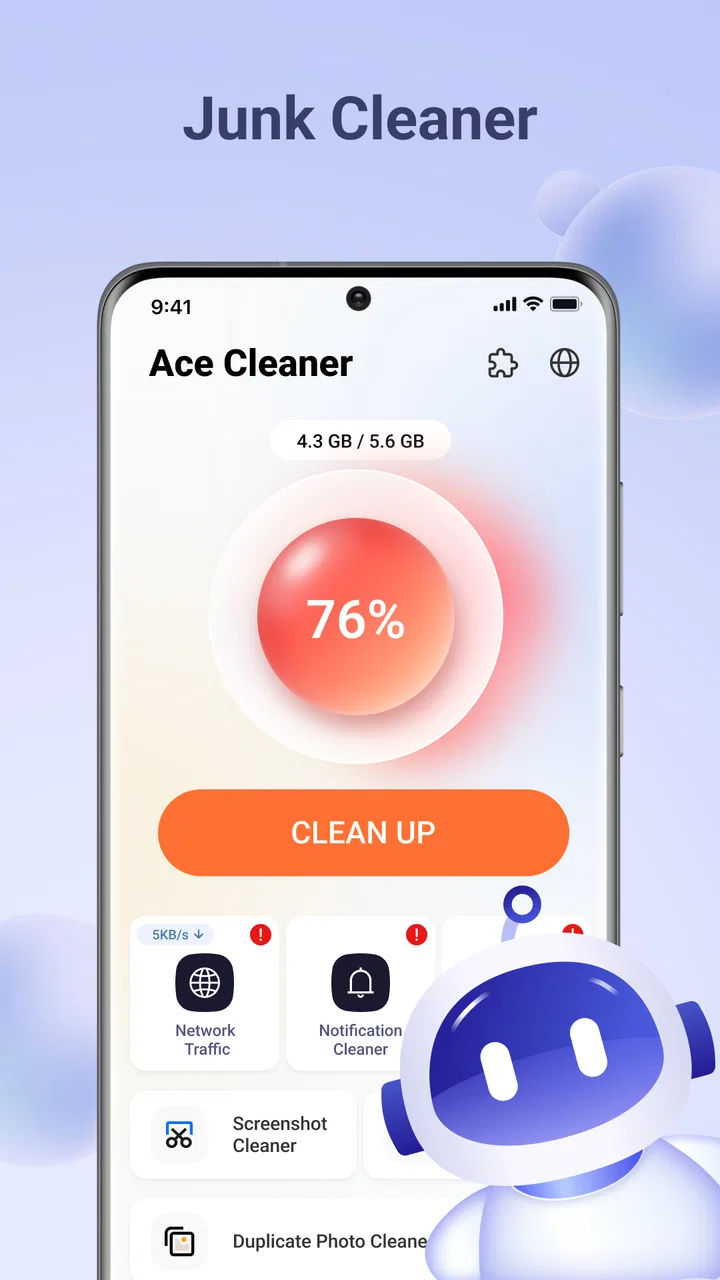
Ace Cleaner brings junk-file cleanup together with organization for photos, videos, and documents. In practice, that makes it better suited to a phone that feels untidy than to a device with one single, obvious storage problem. I can approach the cleanup by file type and make more deliberate decisions instead of opening unrelated folders one at a time.
I also like that this is a focused utility rather than a general-purpose productivity suite. Its purpose is easy to understand: reduce clutter and make personal files easier to review. The store short description is simply “Ace Cleaner,” while the fuller promise is about cleaning junk and organizing common file categories. That narrow identity is helpful for someone who wants a straightforward maintenance tool rather than another large app with many unrelated functions.
The app has reached over five million installs and holds a four-point average from around three thousand ratings, with dozens of written reviews. Those figures suggest that it has found a real audience, but they do not replace personal judgment. A cleaner can be popular and still be a poor fit for someone who wants highly technical storage analysis or complete control over every folder.
Sorting is more important than deleting
When I use a tool like this, the first benefit is often awareness. Seeing the phone’s clutter grouped into understandable areas makes the problem less vague. Instead of thinking, “I need more space,” I can ask better questions: Are old videos the main issue? Are documents scattered across several locations? Are there files I no longer recognize?
That change in perspective is one of Ace Cleaner’s strongest practical effects. It turns a vague storage complaint into a series of manageable reviews. I can deal with personal media separately from disposable files, which lowers the chance of making a rushed decision.
My advice is to begin with the category that is easiest to judge. For many people, that will be old screenshots or downloaded documents rather than family photos. Clearing a low-risk group first creates a quick improvement without forcing a difficult decision about memories or work files.
How I would use it in practice
I would not open Ace Cleaner and immediately approve every suggested cleanup. My routine would be more cautious: inspect the broad result, open the relevant category, scan names or previews where available, and remove only items whose purpose is clear. That extra minute or two is worthwhile because storage cleanup is irreversible in many everyday situations.
A useful workflow is to handle the phone in passes. The first pass is for obvious clutter: files I recognize as temporary, outdated, or accidentally retained. The second is for media that needs a decision, such as several versions of the same video or a group of screenshots. The final pass is for documents, where a file may look old but still be needed later.
This approach also prevents a common mistake: confusing “not recently opened” with “not useful.” A tax document, travel confirmation, or school file may sit untouched for months and still matter. Ace Cleaner can help surface organization problems, but I remain responsible for understanding the files before removal.
For photos and videos, I would reserve a quiet moment rather than clean while rushing out the door. Media decisions are slower because visual memories are harder to identify from filenames alone. If the app presents a large group for review, I would start with obvious duplicates, accidental recordings, and clips that were created only for temporary sharing.
Documents deserve a separate habit. I would check whether a file belongs to work, school, travel, finances, or personal records before deleting it. If I am unsure, I would leave it alone and revisit it later. A cleaner is helpful when it reduces clutter, but it should not turn uncertainty into accidental loss.
A realistic everyday scenario
Imagine returning from a weekend trip with a phone full of photos, short videos, screenshots of tickets, restaurant menus, and downloaded confirmations. A few weeks later, the trip is over, but all those files remain mixed together. This is where I see Ace Cleaner making the biggest difference.
I would first review the photos and videos, keeping the meaningful images while removing accidental shots and clips that add no value. Next, I would inspect the documents and screenshots. The ticket screenshots may no longer be needed, while a receipt or reservation document might still be worth keeping. Finally, I would look at the junk area and remove only what is clearly disposable.
The advantage is not that the phone magically understands the trip. The advantage is that the cleanup can be approached as one organized session. Without a tool like this, I might check the gallery, then a downloads folder, then a separate file manager, and eventually give up. Ace Cleaner reduces that friction by giving the process a clearer starting point.
I would also repeat the routine after major events rather than waiting for a storage warning. After a holiday, a move, a large work project, or a family celebration, the phone tends to collect a predictable mix of temporary files and valuable memories. Reviewing those groups while I still remember their context is safer than trying to interpret them much later.
Where the trade-offs become clear
The main trade-off is convenience versus certainty. A dedicated cleaner can make discovery faster than manually browsing folders, but speed can tempt me to approve actions too quickly. I would consider Ace Cleaner a partner in the review process, not an authority over my personal files.
Another limitation is that no cleaner can solve poor storage habits by itself. If I keep every received video, save multiple copies of the same document, and never revisit downloads, the clutter will return. Ace Cleaner can make maintenance easier, but I still need a simple rule for what I keep and why.
Privacy is also part of the decision. Photos, videos, and documents are personal categories, so I would pay attention to what the app asks me to review and avoid granting trust blindly to any utility. I would use it on files I understand, keep important material backed up through my normal method, and avoid treating a cleanup session as a substitute for backup.
It is also worth remembering that Android already includes storage controls and many phones include a built-in file manager or gallery cleanup option. Those tools may be enough for someone who only needs to remove a few large files occasionally. Ace Cleaner becomes more appealing when I want a dedicated place to review several file types in one sitting.
On the other hand, users who need advanced folder-level analysis, detailed storage charts, network tools, or professional document management may find a specialized file manager more suitable. Ace Cleaner’s strength is accessibility and focus, not technical depth. I would not choose it as my only tool for managing a complicated work archive.
Small habits that make the app safer
My first practical tip is to clean in categories, not in one large sweep. Photos, videos, documents, and junk have different levels of risk. Separating them makes it easier to stop when a decision becomes uncertain.
My second tip is to review recently created clutter before older personal files. Recent downloads and accidental recordings are easier to recognize because I still remember why they appeared. This gives me a safer early win and avoids the emotional cost of starting with years of photos.
My third tip is to use the app before transferring a large batch of new media. If I clear obvious clutter first, I can see which files genuinely deserve space and avoid copying unnecessary duplicates to another device. This is especially useful after recording many short videos at an event.
A fourth useful trade-off is to value organization even when the storage gain is small. Removing a few files may not transform the phone’s capacity, but separating important documents from forgotten downloads can save time later. For me, that organizational benefit is sometimes more valuable than the number of files removed.
Who will gain the most from Ace Cleaner?
I think this app is a good match for people who feel their phone is messy but do not want to learn a complicated file-management system. It should also suit users who regularly collect media, download documents, or share files and then forget about them. The Everyone content rating and support for Android 7.0 or later make it approachable for a broad range of Android users.
It is particularly useful for someone who keeps asking why storage is disappearing without knowing which category is responsible. The combined view gives that person a practical place to begin. It can also help family members who are comfortable taking photos and videos but less comfortable navigating folders and system storage menus.
I would be more cautious about recommending it to a user who already has a disciplined storage routine. If the built-in Android tools are sufficient and the phone is easy to manage, installing another utility may add little value. Likewise, anyone who needs precise control over complex folders should look for a more advanced file-management solution.
The developer is Veristocop18, and the current release is V1.1.1. Since the app is free, it is easy to try without making it a financial commitment. Still, “free” does not mean I would skip the normal care I use with any app handling personal files. I would read each cleanup screen, keep important material backed up, and avoid approving a broad deletion simply because it looks convenient.
For me, the deciding factor is whether I want a guided cleanup session or a technical storage instrument. If I want the former, Ace Cleaner makes sense. If I want deep diagnostics, manual folder rules, or a professional archive workflow, I would choose a more specialized alternative and perhaps use this app only for occasional personal maintenance.
My final view after using its main strength
Ace Cleaner works best when I use it to turn an untidy phone into a set of understandable decisions. Its focus on junk files, photos, videos, and documents gives it a clear everyday purpose, and the free price removes much of the hesitation involved in testing a cleanup utility.
I would not describe it as a replacement for careful file management, backups, or a full-featured file explorer. Its real value is simpler: it lowers the effort needed to notice clutter and gives me a more organized way to deal with it. The app is strongest for routine personal cleanup, especially after travel, events, or periods of heavy downloading.
My recommendation is to use it slowly the first time, learn how its categories present your files, and develop a repeatable review habit. If you want one focused place to inspect common sources of phone clutter, Ace Cleaner is worth trying. If your needs are technical or your storage is already well organized, the built-in tools may be enough.
FAQs for Ace Cleaner
01What is Ace Cleaner and what does it do?
Ace Cleaner is a mobile application designed to optimize the performance of your Android device. It offers features such as junk file cleaning, memory boosting, and CPU cooling. By removing unnecessary files and managing background apps, it helps improve your device's speed and battery life. Ideal for users looking to maintain their phone's efficiency.
02Is Ace Cleaner free to use?
Ace Cleaner offers a free version with essential features like junk file cleaning and memory boosting. However, to access advanced features such as deep cleaning or ad-free usage, you may need to purchase a subscription. The app's pricing structure is flexible, catering to both casual users and those in need of comprehensive cleaning solutions.
03How does Ace Cleaner improve phone performance?
Ace Cleaner enhances phone performance by cleaning up junk files, optimizing memory usage, and cooling down the CPU. It identifies and removes unnecessary files that slow down your device. Additionally, it manages apps running in the background, freeing up RAM and preventing overheating, which collectively boosts overall performance.
04Is Ace Cleaner safe to use on my device?
Yes, Ace Cleaner is safe to use on your device. It is designed to carefully identify and remove only unnecessary files, ensuring that important data is not compromised. The app is regularly updated to maintain security and compatibility with the latest Android versions, providing a reliable cleaning experience.
05Can Ace Cleaner help extend my phone's battery life?
Ace Cleaner can aid in extending your phone's battery life by optimizing system resources. By reducing unnecessary background processes and cooling the CPU, it minimizes battery drain. This optimization process ensures that your device consumes energy more efficiently, contributing to longer battery life during regular usage.
Pros
- User-friendly interface for easy navigation.
- Efficient junk file cleaning boosts performance.
- App lock feature enhances privacy and security.
- Battery saver extends device lifespan.
- Lightweight app doesn't consume much storage.
Cons
- Contains ads that may disrupt usage.
- Limited features in free version.
- Occasional false positives in junk detection.
- Requires frequent updates for optimal performance.
- No real-time antivirus protection included.

Ace Cleaner
Gallery